AWS ユーザに送る Azure 権限管理 (RBAC) 入門

AWS や Google Cloud にも言えることですが、初めて Azure を利用する際には情報が膨大過ぎてどこからキャッチアップを始めれば良いか戸惑うことでしょう。
自分自身もだいぶ苦労したことから、同じような境遇の方に向けて Azure の入門記事を書くには何が良いだろうかと考えたところ、権限管理についての入門記事を書けば Azure の用語やコンセプトなどの理解も深まるし、どのサービスを使うにしても活きてくるのではと思い立ちました。
というわけで、今回は Azure におけるリソースの権限管理について基本的な内容について説明します。
なお、Azure のリソースの権限管理と Entra ID(旧 Azure Active Directory)の権限管理は別物で、今回焦点を当てるのは前者のみです。読者としては Azure を使い始めて間もない人で、かつある程度 AWS の知識がある人を想定しています。
RBAC による権限管理
AWS では各種リソースに対してどのような操作ができるかを IAM (Identity and Access Management) で管理しますが、Azure では Azure RBAC(アールバック)が使われます。
RBAC は role-based access control のことで、role に permission を付与して、その role をユーザなどに付与する形式の権限管理方法です。Azure に触れたことがない方でも Kubernetes を運用したことがあれば馴染み深い概念でしょう。
例えば、built-in role の Contributor role は次のように定義されています。
$ az role definition list --name "Contributor" | sed "s/$(az account show --query id -o tsv)/{subscriptionId}/g"
[
  {
    "assignableScopes": [
      "/"
    ],
    "createdBy": null,
    "createdOn": "2015-02-02T21:55:09.880642+00:00",
    "description": "Grants full access to manage all resources, but does not allow you to assign roles in Azure RBAC, manage assignments in Azure Blueprints, or share image galleries.",
    "id": "/subscriptions/{subscriptionId}/providers/Microsoft.Authorization/roleDefinitions/b24988ac-6180-42a0-ab88-20f7382dd24c",
    "name": "b24988ac-6180-42a0-ab88-20f7382dd24c",
    "permissions": [
      {
        "actions": [
          "*"
        ],
        "condition": null,
        "conditionVersion": null,
        "dataActions": [],
        "notActions": [
          "Microsoft.Authorization/*/Delete",
          "Microsoft.Authorization/*/Write",
          "Microsoft.Authorization/elevateAccess/Action",
          "Microsoft.Blueprint/blueprintAssignments/write",
          "Microsoft.Blueprint/blueprintAssignments/delete",
          "Microsoft.Compute/galleries/share/action",
          "Microsoft.Purview/consents/write",
          "Microsoft.Purview/consents/delete",
          "Microsoft.Resources/deploymentStacks/manageDenySetting/action",
          "Microsoft.Subscription/cancel/action",
          "Microsoft.Subscription/enable/action"
        ],
        "notDataActions": []
      }
    ],
    "roleName": "Contributor",
    "roleType": "BuiltInRole",
    "type": "Microsoft.Authorization/roleDefinitions",
    "updatedBy": null,
    "updatedOn": "2024-11-18T20:00:23.830435+00:00"
  }
]
notActions で指定されている一部の actions を除いて全ての actions が許可されているのが雰囲気でわかるかと思います。
Azure には AWS IAM の inline policy に相当するものは存在しないので、ユーザ等に権限を付与するには必ず何かしらの role を付与することになります。よって、built-in role に所望の権限を持ったものがない場合は、custom role を定義する必要があります。
例えば、拙作の Azure Key Vault Provider の terraform apply 用の custom role は次のような定義になります。
{
  "Name": "Terraform Provider for Azure Key Vault Applier",
  "Actions": [
    "Microsoft.KeyVault/vaults/read"
  ],
  "DataActions": [
    "Microsoft.KeyVault/vaults/secrets/delete",
    "Microsoft.KeyVault/vaults/secrets/readMetadata/action",
    "Microsoft.KeyVault/vaults/secrets/setSecret/action"
  ],
  "AssignableScopes": [
    "/subscriptions/$subscriptionId"
  ]
}
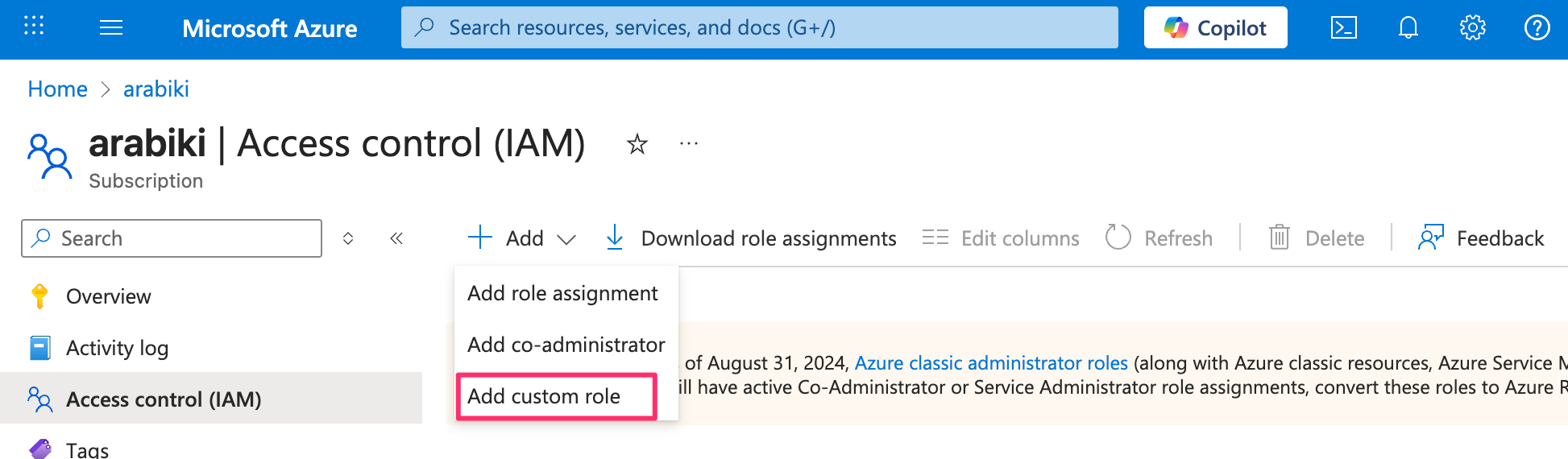
Azure portal から custom role を作成するにはどの scope(後述)を対象にするかにもよりますが、subscription 全体で利用する場合は subscription の詳細画面の Access control (IAM) から Add custom role をクリックします。
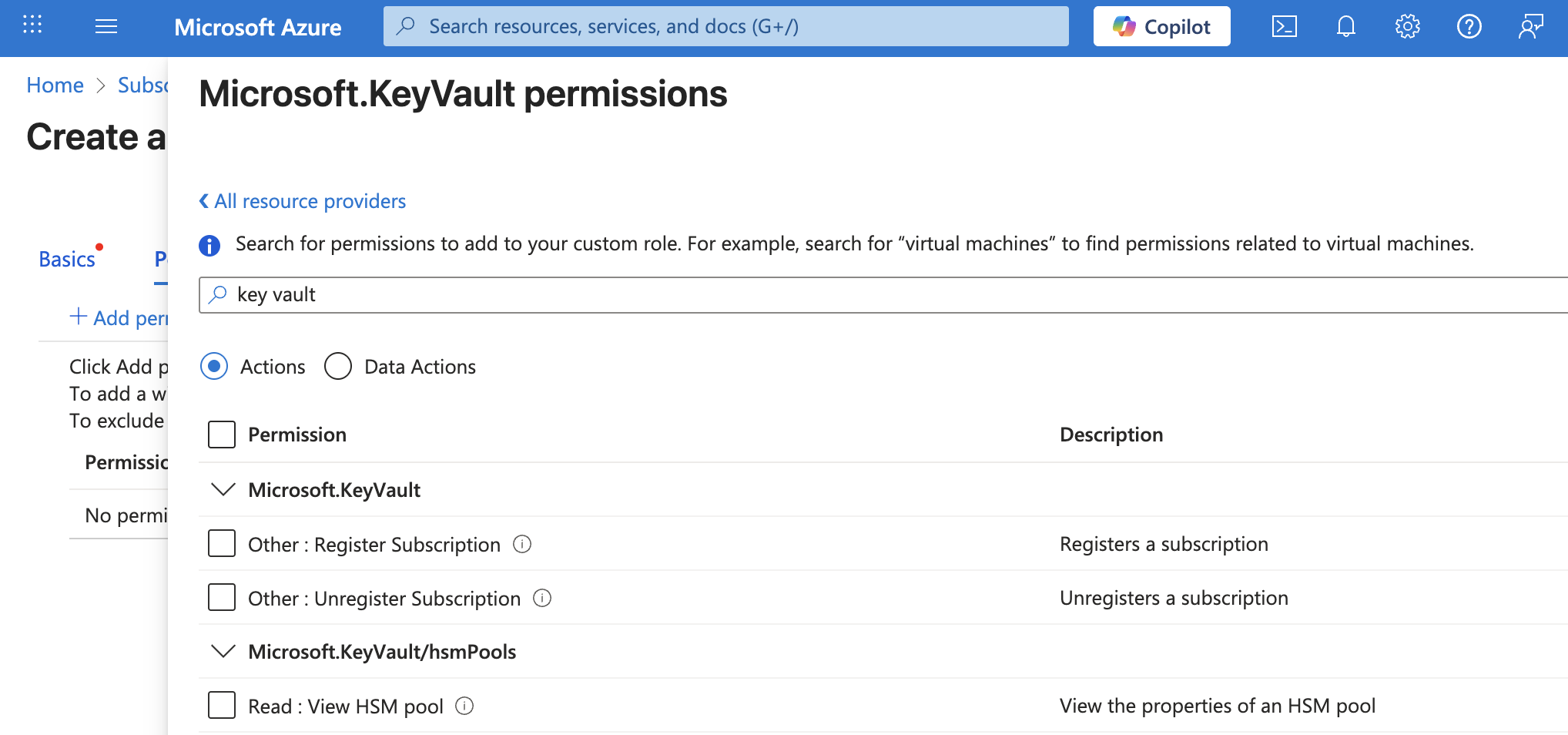
Azure portal 上からだと対象サービス(resource provider)を選択することで permission を付与する action の一覧が出てくるので、付与すべき permission がわからない場合は一度 Azure portal から作成するのが良いでしょう。
Actions と Data actions
Contributor role などの定義や permission の選択画面に data action という言葉が出てきたことに気付いた方も多いかと思います。
次の結果は Owner role の定義ですが、全ての actions が許可されている一方で、data actions は何も許可されていないため、Owner role という何でもできる権限を持っていそうな role にも関わらず、実行できない操作があることを意味します。
$ az role definition list --name "Owner" | sed "s/$(az account show --query id -o tsv)/{subscriptionId}/g"
[
  {
    "assignableScopes": [
      "/"
    ],
    "createdBy": null,
    "createdOn": "2015-02-02T21:55:09.880642+00:00",
    "description": "Grants full access to manage all resources, including the ability to assign roles in Azure RBAC.",
    "id": "/subscriptions/{subscriptionId}/providers/Microsoft.Authorization/roleDefinitions/8e3af657-a8ff-443c-a75c-2fe8c4bcb635",
    "name": "8e3af657-a8ff-443c-a75c-2fe8c4bcb635",
    "permissions": [
      {
        "actions": [
          "*"
        ],
        "condition": null,
        "conditionVersion": null,
        "dataActions": [],
        "notActions": [],
        "notDataActions": []
      }
    ],
    "roleName": "Owner",
    "roleType": "BuiltInRole",
    "type": "Microsoft.Authorization/roleDefinitions",
    "updatedBy": null,
    "updatedOn": "2021-11-11T20:13:45.897885+00:00"
  }
]
data actions の説明は次のとおりで、data plane に対する actions を意味します。
The
DataActionspermission specifies the data plane actions that the role allows to be performed to your data within that object. For example, if a user has read blob data access to a storage account, then they can read the blobs within that storage account. Here are some examples of data actions that can be used inDataActions.
cf. DataActions
では data plane とは何なのかというと、Azure control plane and data plane に説明があるんですが、control plane と data plane の違いに関する感覚を掴むのは難しいかと思います。
とりあえず Owner でも権限不足でエラーになることがあることを覚えておくと良いでしょう。
例えば、Azure では秘匿値を管理するのに Key Vault secrets が利用されますが、secret value を取得するには Microsoft.KeyVault/vaults/secrets/getSecret/action の data action が許可されている必要があるので、Owner といえどもこの data action の権限を持った role が付与されていなければ値を参照できません。このことは secret value を取得するための role である Key Vault Secrets User role の定義からもわかります。
$ az role definition list --name "Key Vault Secrets User" | sed "s/$(az account show --query id -o tsv)/{subscriptionId}/g"
[
  {
    "assignableScopes": [
      "/"
    ],
    "createdBy": null,
    "createdOn": "2020-05-19T17:52:47.204924+00:00",
    "description": "Read secret contents. Only works for key vaults that use the 'Azure role-based access control' permission model.",
    "id": "/subscriptions/{subscriptionId}/providers/Microsoft.Authorization/roleDefinitions/4633458b-17de-408a-b874-0445c86b69e6",
    "name": "4633458b-17de-408a-b874-0445c86b69e6",
    "permissions": [
      {
        "actions": [],
        "condition": null,
        "conditionVersion": null,
        "dataActions": [
          "Microsoft.KeyVault/vaults/secrets/getSecret/action",
          "Microsoft.KeyVault/vaults/secrets/readMetadata/action"
        ],
        "notActions": [],
        "notDataActions": []
      }
    ],
    "roleName": "Key Vault Secrets User",
    "roleType": "BuiltInRole",
    "type": "Microsoft.Authorization/roleDefinitions",
    "updatedBy": null,
    "updatedOn": "2021-11-11T20:14:30.954282+00:00"
  }
]
なお、secret value の取得に使われるのが Get Secret API ですが、API のドキュメントからはどの action を許可すべきか想像が付かないため、built-in role に対して許可されている action や custom role 作成時の action の一覧の説明文から必要な権限を想像することになります。
Role assignment の scope
AWS IAM では action の対象として Resource を指定しますが、似たような概念として Azure RBAC では role を付与する際に scope を指定します。
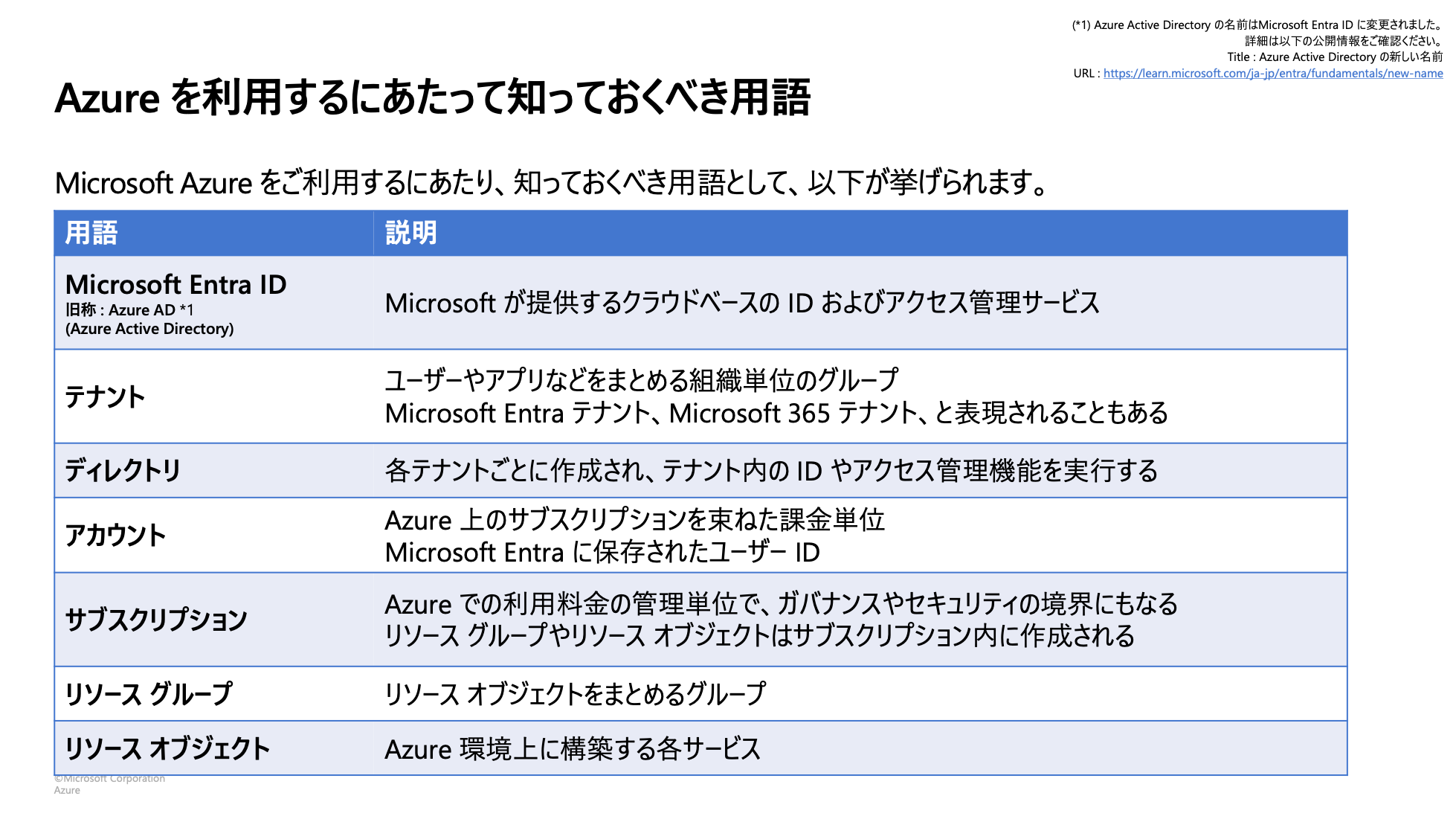
RBAC における scope を理解するには Entra ID, tenant, directory, management group, subscription, resource group という用語を理解しておくと良いです。
management group 以外については Microsoft Azure利用ガイド_2024年1月版 の 5 ページ目にこれらの用語について簡潔にまとまっている表があったのでそちらを拝借します。
management group は複数の subscription などを管理するのに使えるもので、初期状態では Tenant Root Group のみが存在します。
図で表現すると次のような階層関係になります。
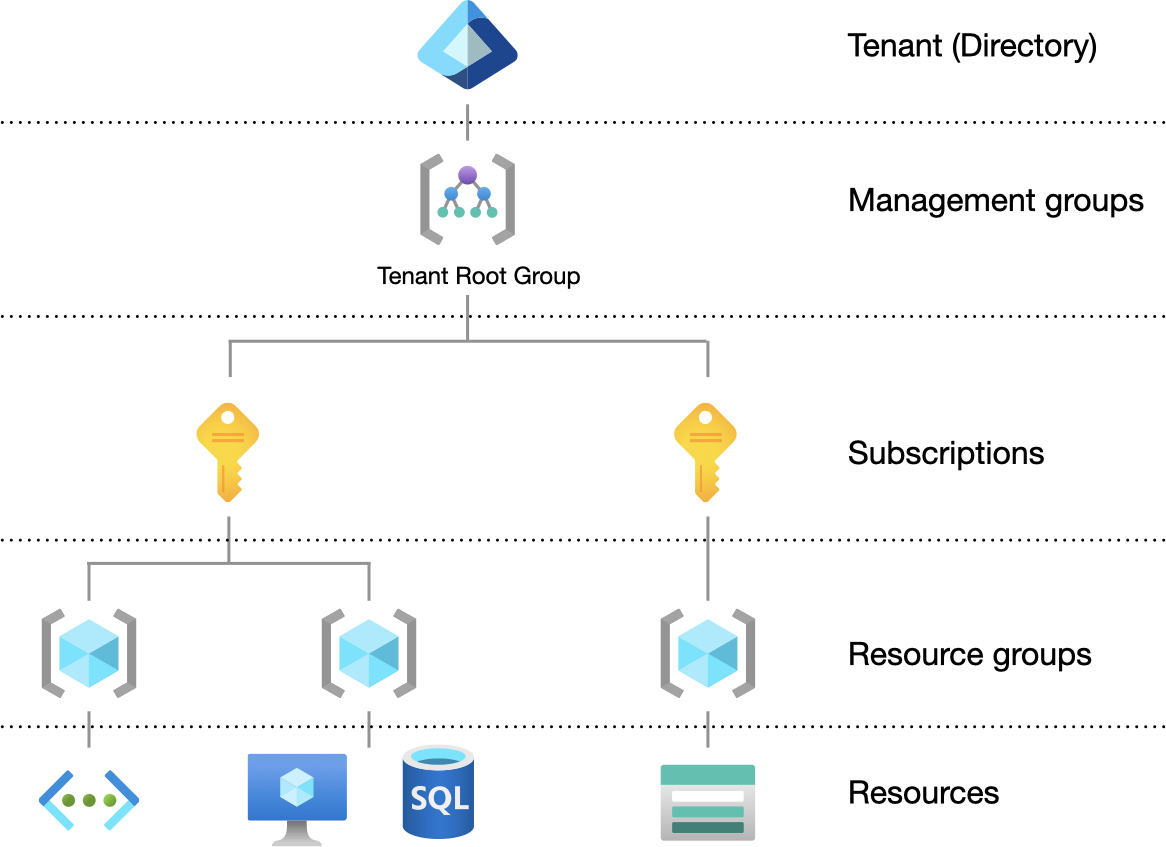
上位に存在するリソースを scope として role を付与すると、その下位に存在するリソースに対しても role の権限を付与することになります。例えば、subscription リソースを対象に Key Vault Secrets User role を付与した場合、その subscription で管理されている全の secret を取得可能になります。
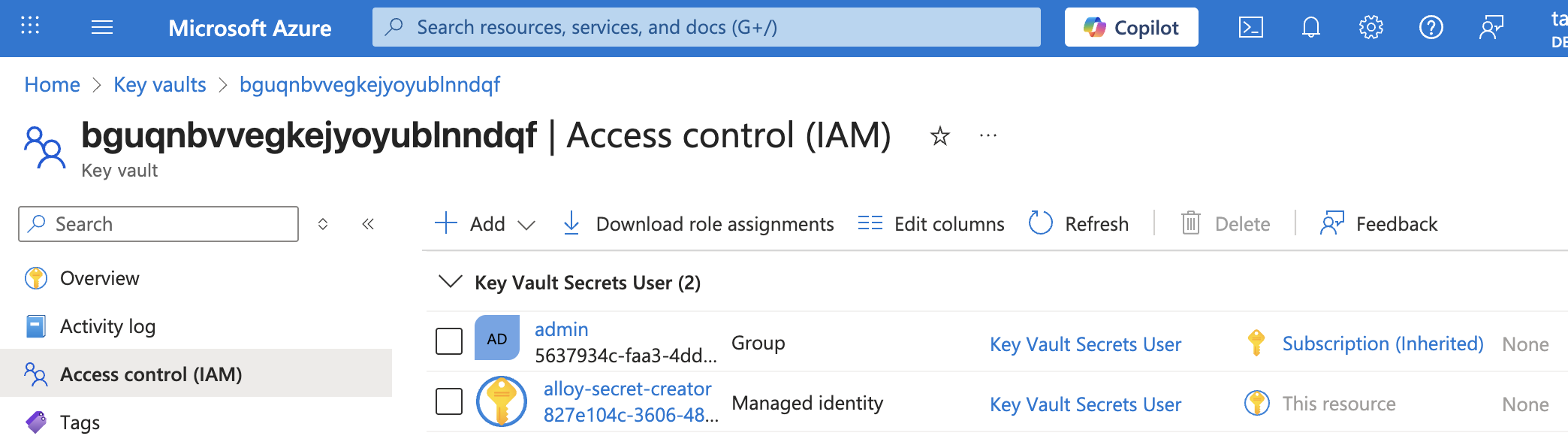
以下の図は bguqnbvvegkejyoyublnndqf という名前の Key Vault に対する role assignments の一覧ですが、admin group には subscription を scope に、alloy-secret-creator にはこのリソース(bguqnbvvegkejyoyublnndqf)を scope に Key Vault Secrets User role が付与されていることがわかります。
なお、通常のサービスには本番環境以外に開発用の環境など複数の環境が存在することが一般的ですが、このことからも、Azure では環境ごとに subscription を分けることが推奨されています。
Management boundary: Subscriptions provide a management boundary for governance and isolation, which allows a clear separation of concerns. Various environments, such as development, test, and production environments, are often removed from a management perspective.
cf. Organization and governance recommendations
Role assignment
AWS では IAM という 1 つのサービスが存在し、AWS managemnet console 上でユーザ等に権限を付与する際には IAM service にアクセスして操作しますが、Azure portal には RBAC と呼ばれるようなサービスはありません。
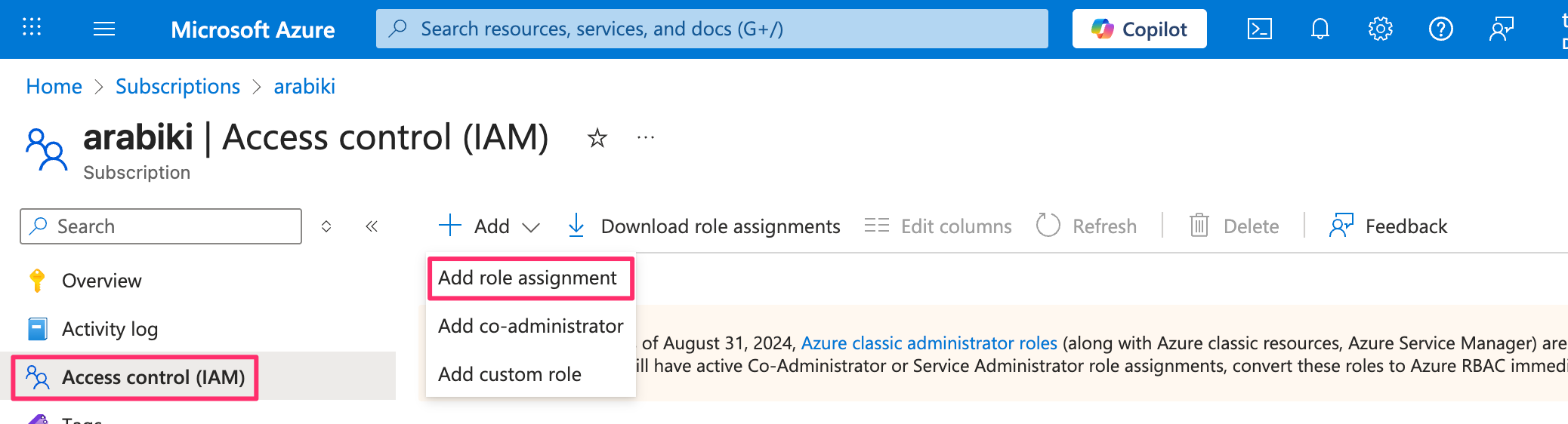
ではどうやって role を付与するかというと、role の scope となるリソースの Access control (IAM) メニューから付与します。
前述のとおり、付与できるのは role のみで、AWS IAM の inline policy に相当するものは存在しないので、built-in role に所望の権限を持ったものがない場合は、custom role を定義する必要があります。
各 role の権限は role を付与する際の一覧の Details から確認することができます。

Access control (IAM) の Roles タブからも確認することができます。

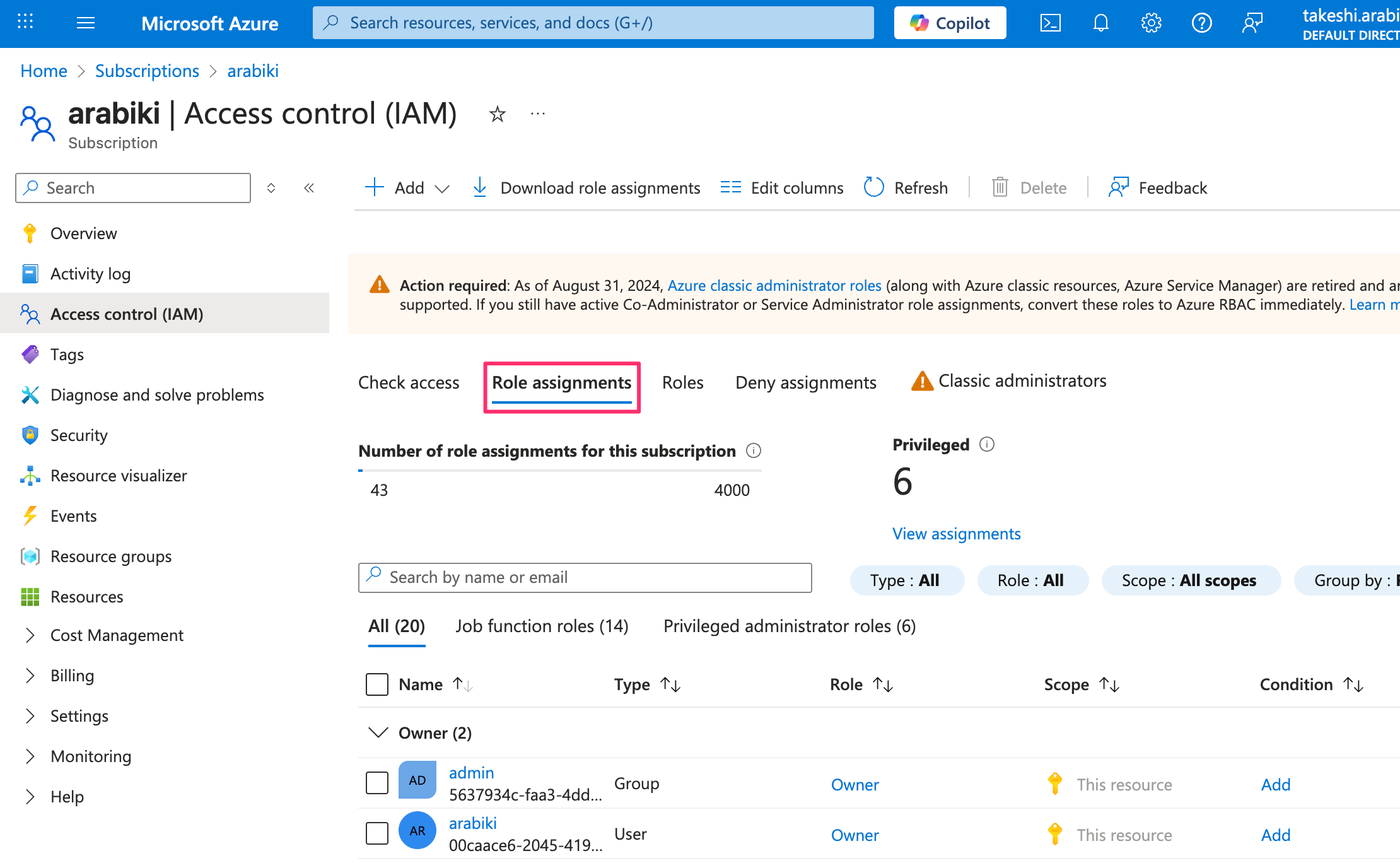
なお、付与されている role については、対象リソースの Role assignments で確認できます。
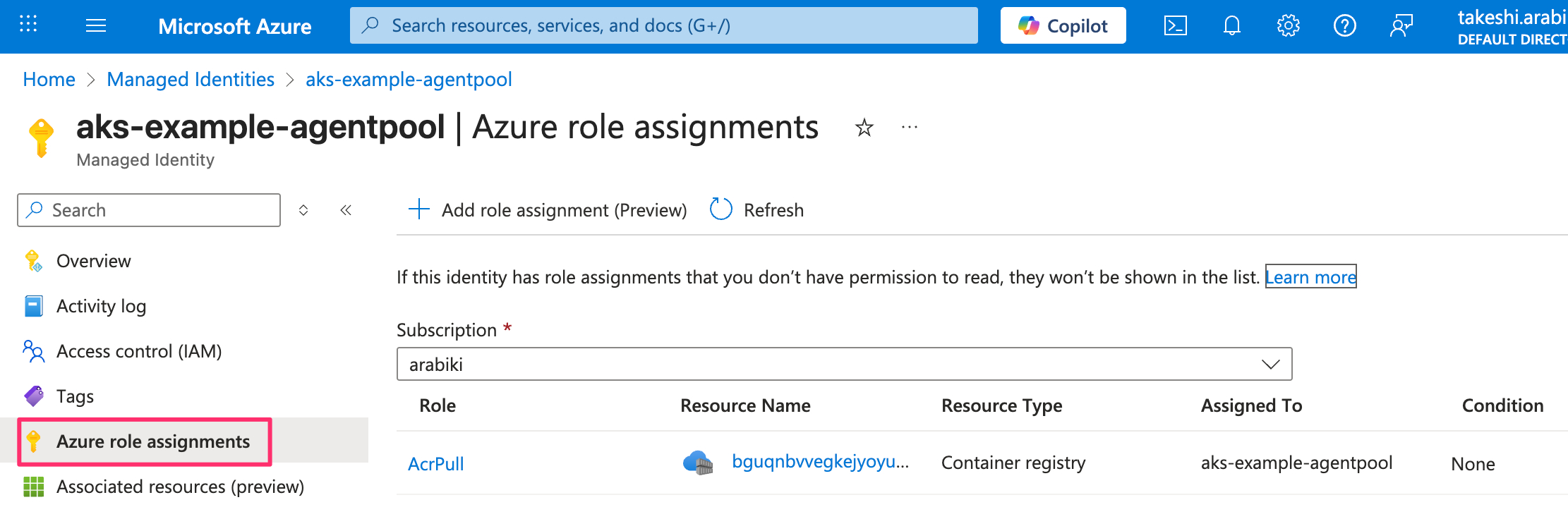
特定のユーザなどに付与されている role を確認するには、確認したいリソースの詳細画面の Azure role assignments にアクセスします。
次の図では aks-example-agentpool という managed identity(後述)の権限を表示しています。
Role assignment の対象 (Identity)
AWS では権限を付与する対象として IAM user、IAM instance profile、ECS task IAM role などがありますが、Azure にも様々な概念があります。
自分が知る限り、大きく分類すると次の 5 種類が存在します。
- Entra ID user
- Entra ID group
- Service principal
- Managed identity
- Workload identity
Entra ID user/group に関しては IAM user/group のようなもので説明不要かと思いますが、残りの 3 つに関しては初見だとそれっぽい公式ドキュメントを読んでも理解するのが難しいかと思います。少なくとも僕は未だに自信を持って理解できているとは言えません…。
service principal の正確な説明は後回しにして、ひとまずわかりやすさを重視して service principal, managed identity, workload idenity について説明します。
Service principal
認証の文脈で service principal という用語が出てきたら、client secret や certificate によって認証する machine user と理解するのが良いと思います。
例えば次のドキュメントではこの意味で使われています。
- Azure Provider: Authenticating via a Service Principal and a Client Secret | Guides | hashicorp/azurerm | Terraform | Terraform Registry
- EnvironmentCredential
Azure CLI でも同様の意味で使われています。
$ az login --help
-- snip --
Arguments
-- snip --
    --service-principal      : Log in with a service principal.
どのような時に利用するかというと、Azure 外から Azure のリソースにアクセスする必要がある時に利用します。具体的には以下のようなケースが挙げられます。
- ローカル環境から Entra ID user/group 以外の権限でリソースにアクセスしたい
- 特定のアプリケーションを動かすのに必要な権限が何かを試行錯誤するのに便利
- Datadog、Grafana Cloud のような外部サービスと連携したい
- OIDC 連携したい 1
- GitHub Actions の例: Configuring OpenID Connect in Azure - GitHub Docs
service principal を作成するには、Azure portal だと App registrations から New registration をクリックし、Azure CLI だと次のコマンドを実行します。
az ad sp create-for-rbac
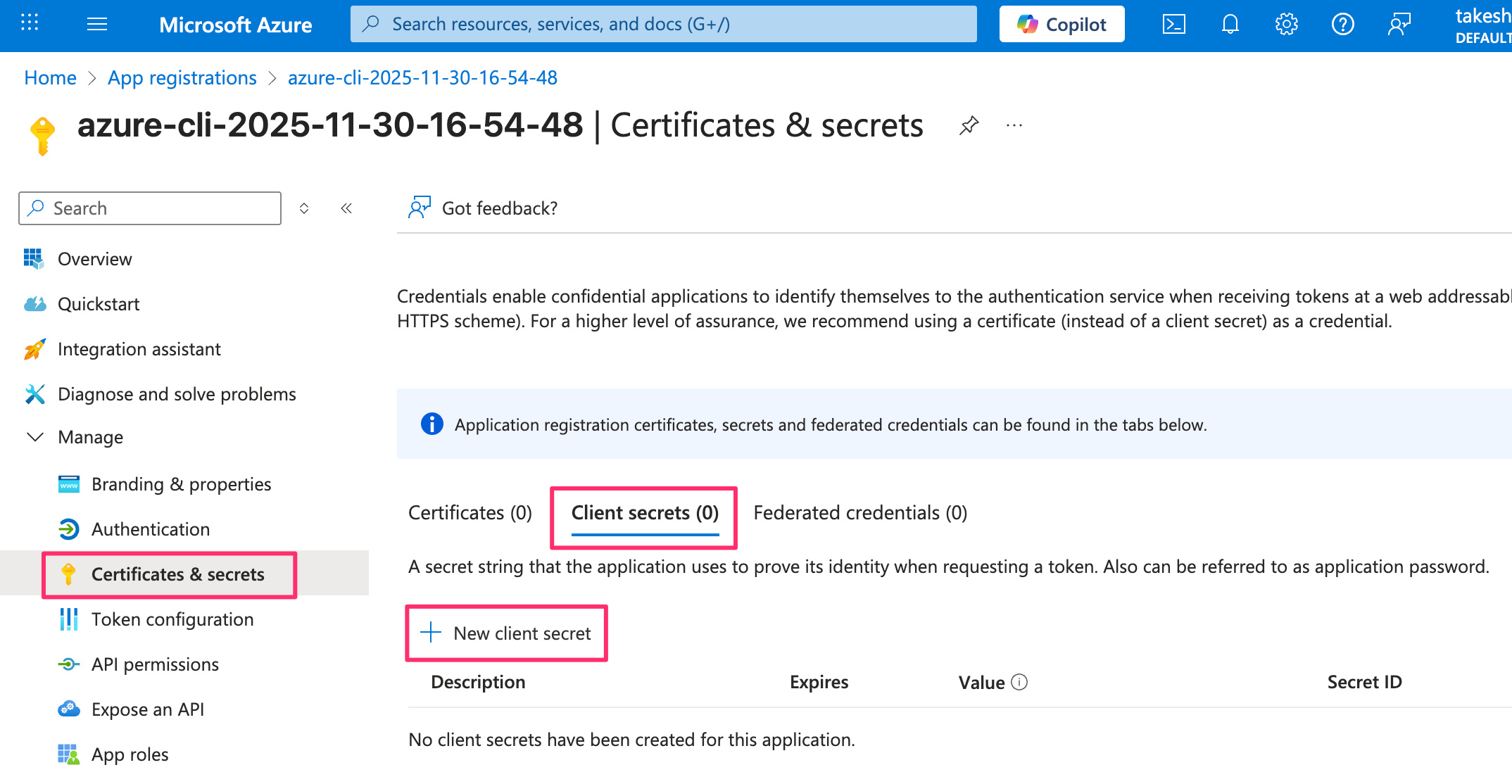
Azure portal から作成する場合は自動的には client secret が作成されませんが、Azure CLI から作成する場合は --create-password false を指定しない限り自動的に 1 年間有効な client secret が作成されます。
Azure portal や --create-password false を指定して作成した場合は App registrations から当該 service principal を選択することで client secret を作成できます。
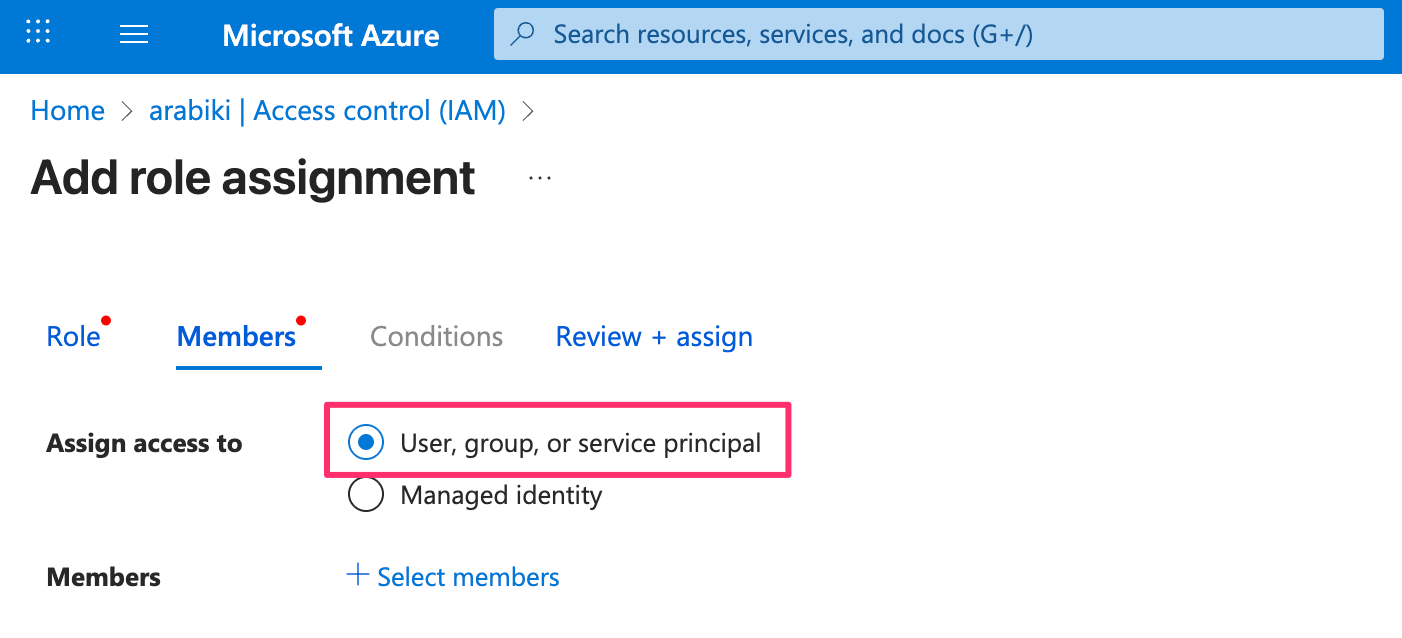
service principal に role を付与するには、role assignment の際に Assign access to で “User, group, or service principal” を選択します。
なお、Azure 内で Azure のリソースにアクセスするケースでは後述する managed identity を利用することが推奨されています。
Managed identity
managed identity は Azure 内でのみ利用可能な machine user と理解するのが良いと思います2。service principal は client secret や certificate が必要でしたが、managed identity ではそのような credential を管理する必要はありません。この観点では AWS の IAM instance profile や ECS task IAM role に近いです。
managed idenitty には system identity という、リソースと不可分な managed identity と、user identity という複数のリソースに紐付けることが可能な managed identity があります。よって、AWS の IAM role に近いのは user identity です。
Managed identity が使われる代表的な例は Azure Virtual Machines (AWS の EC2 に相当) で、Azure portal から Virtual Machine (VM) を作成する際に system assigned managed identity を有効にすることができます。後から user managed identity を紐付けることもできます。
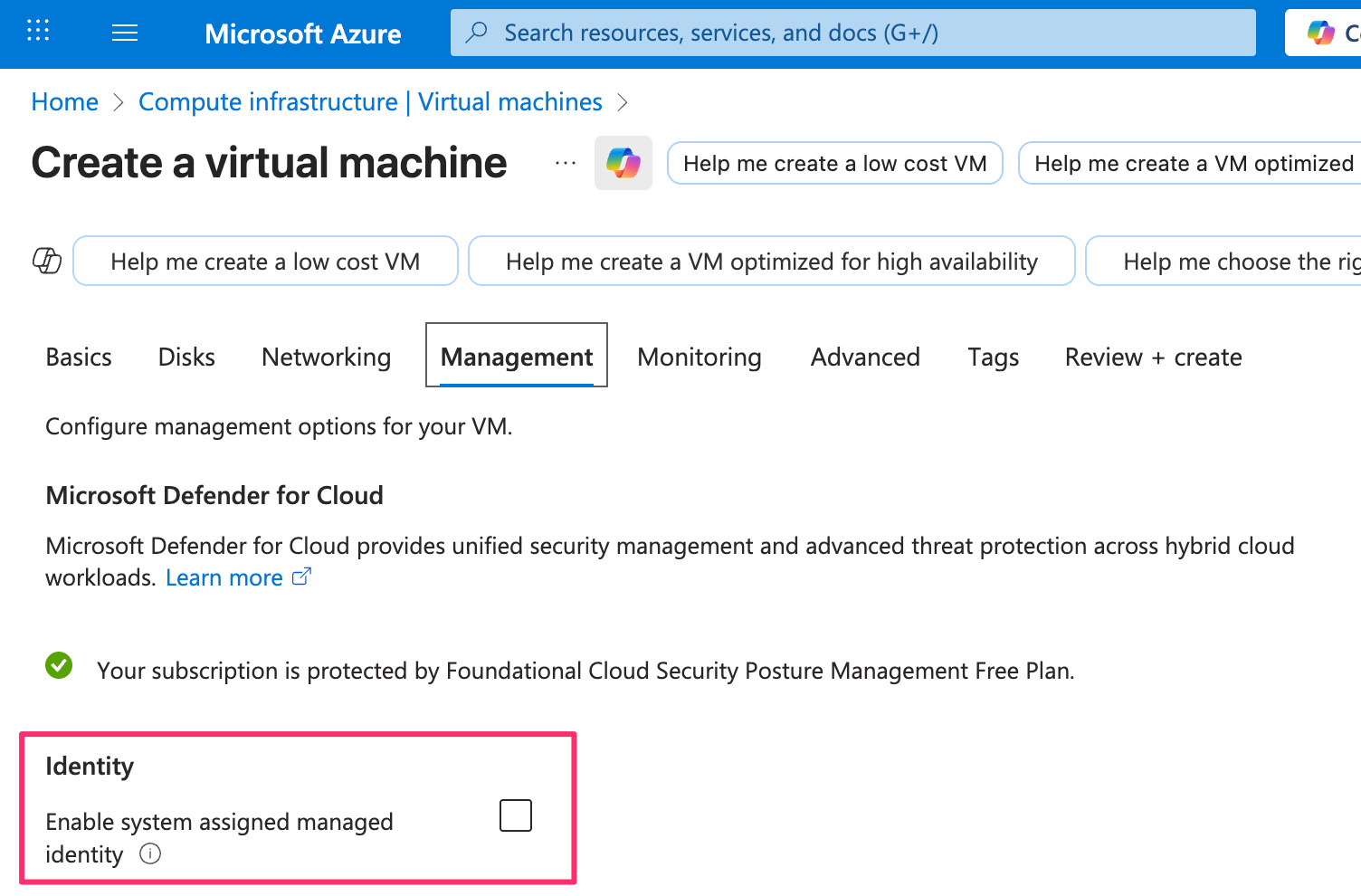
VM に managed identity が紐付いている場合、例えば azure-sdk-for-go の DefaultAzureCredential を使ったアプリケーションを VM 上で動かすと、特別な設定をしなくてもリソースにアクセスする際に Azure Instance Metadata Service から access token を取得するようになっています。
managed identity に role を付与するには、role assignment の際に Assign access to で “Managed identity” を選択します。
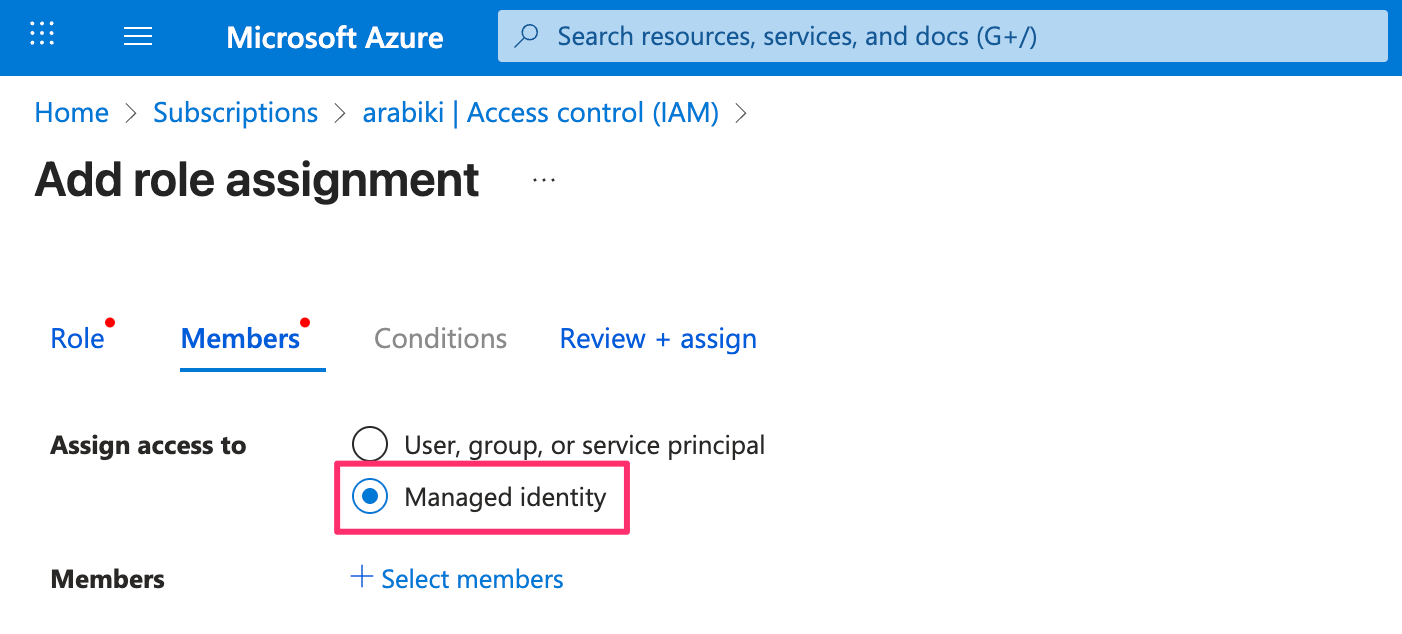
なお、後述するように managed identity は厳密には service principal の一種なので、”User, group, or service principal” を選んで managed identity の名前の先頭何文字かを入力することでも role を付与することができます。
Workload identity
Workload identity は What are workiload identities? では次のように定義されています。
In Microsoft Entra, workload identities are applications, service principals, and managed identities.
ところが、実態としては Azure Kubernetes Service (AKS) の Pod で利用する managed identity という意味で使われることがほとんどかと思います。以下は AKS の Pod で利用する managed identity の意味で使われている例です。
- Azure Provider: Authenticating using managed identities for Azure Kubernetes Service with Workload Identity
- WorkloadIdentityCredential
- Configure Workload Identity
ただし、Configuring OpenID Connect in Azure - GitHub Docs のように managed identity に限定しない使い方がされているケースもあるので、文脈で判断する必要があります。
AKS の Pod で managed identity を利用する方法については Use Microsoft Entra Workload ID with Azure Kubernetes Service (AKS) を参照してください。正しく設定することで Pod に次の環境変数が設定されます。
- AZURE_TENANT_ID
- AZURE_CLIENT_ID
- AZURE_FEDERATED_TOKEN_FILE
これらの環境変数のおかげで、例えば azure-sdk-for-go の DefaultAzureCredential を使ったアプリケーションを Pod 上で動かすと、特別な設定をしなくてもリソースにアクセスする際に access token を取得するようになっています。
workload identity に role を付与する方法は managed identity と同様です。
Service principal とは何なのか?
先ほどはわかりやすさを重視して正確な説明を避けましたが、service principal とは Service principal object で説明されているように、application と managed identity の総称のようです。また、前述のとおり、workload identity は application, service principal, managede identity を指すようです。
しかし Azure の公式ドキュメントを含め、多くのドキュメントでは service principal と managed identity は完全に別物として扱われており、workload identity は AKS で利用する managed identity を指していることがほとんどな印象です。
正確な定義と実際の使われ方を図にすると次のようなイメージになります。
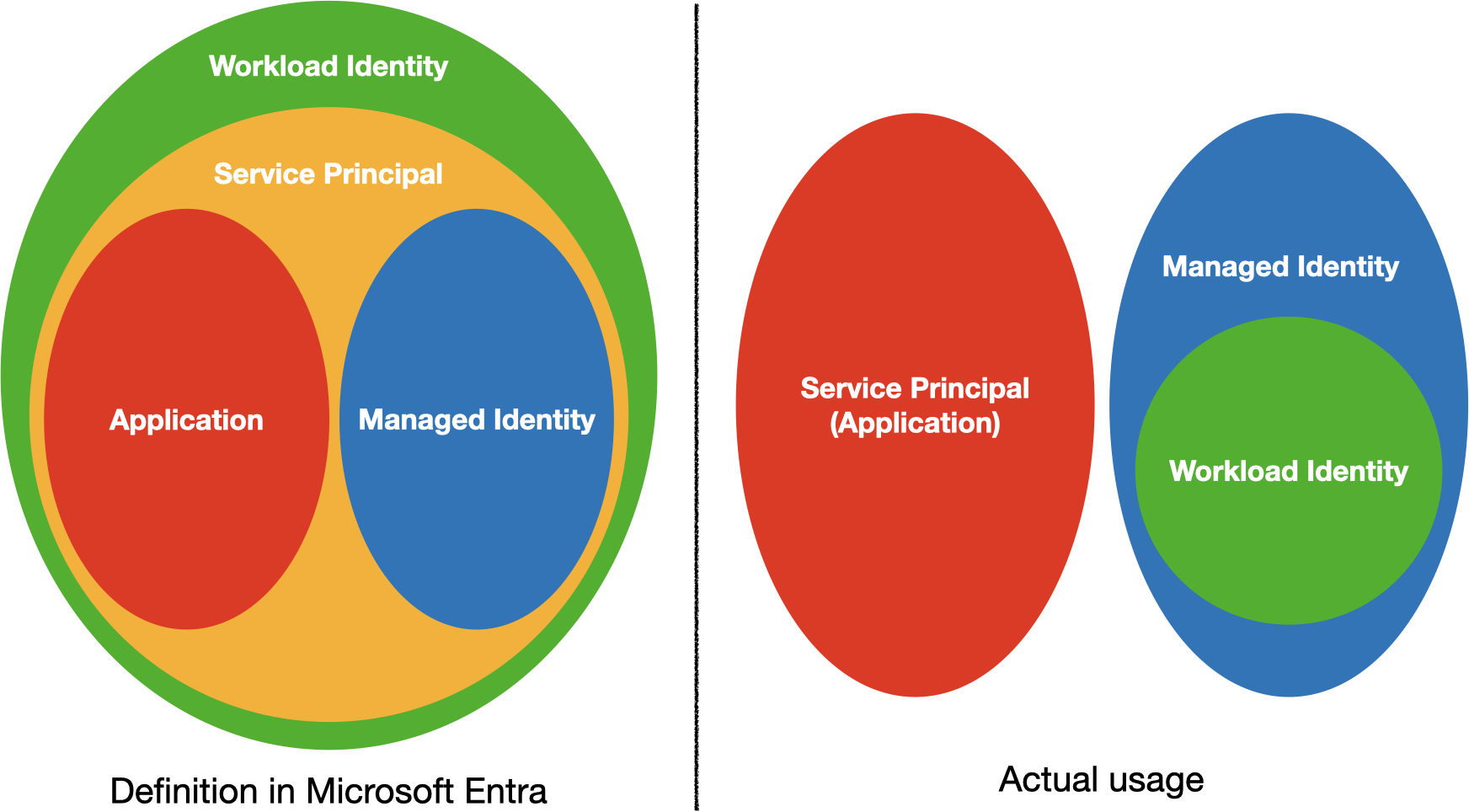
service principal の一覧は Enterprise applications で確認することができ、Application type を Enterprise Applications にすると App registrations で application object を作成した時に同時に作成された service principal (local application) が表示され、Applicatin type を Managed Identites にすると managed identity が表示されるようです。role assignment の際に使われている ID が Enterprise applications の object ID であることからも、service principal が application と managed identity の上位概念であることが伺えます。
ただ、前述のとおり、多くのドキュメントにおいて service principal は application のことを指していて、managed identity とは別物として扱われているので、service principal とは「client secret や certificate によって認証する machine user」と理解しておくのが良いと思います。
なお、application(というより application object?)には Entra ID App Registration Auth using OIDC のように OIDC の機能もありますが今回は触れません。
RBAC 以外の認証・認可
RBAC が使える場合は基本的に RBAC の利用が推奨されていますが、例えば次のように各種 Azure サービス固有の認証・認可方法が提供されているものもあります。
- Manage storage account access keys
- storage account (S3 みたいなもの) に紐付く admin 権限を持った credential を利用する方法で、access key は無効化することが強く推奨されている
- Authenticate to Azure Communication Services - Access Key
- 概念としては storage account の access key と同じ
- Assign a Key Vault access policy (legacy)
- Key Vault に対して誰がどの権限を有しているか access policy を定義する
storage account の blob (object) へのアクセスは data action なので、本来であれば Owner role といえども blob にアクセスできませんが、デフォルトの storage account の設定だと data action の権限を付与しなくてもアクセスできてしまいます。これは Owner role に access key の取得権限があり、access key を使って blob にアクセスするからです。
Terraform のドキュメントを読み解く
Azure 関連の Terraform ドキュメントには、認証に関する用語がたくさん出てくるので理解度チェックには持ってこいです。
Azure のリソースを Terraform で管理する場合、state file は storage account (S3 みたいなもの) で管理すると思いますが、その場合に参照すべきドキュメントは以下の 2 つです。
前者は Terraform に組み込まれていて、後者は provider の一種なので、微妙に認証方法が異なります。
また、Azure Provider は新しい機能をサポートするのに時間がかかるので、Azure が提供している AzAPI Provider も併用することが多いですが、こちらも認証方法が異なります。
つまり、Azure のリソースを Terraform で管理するには 3 種類の認証実装を意識する必要があり、それぞれが利用している package は次のとおりです。
- azurerm backend: http://github.com/hashicorp/go-azure-helpers
- Azure Provider: http://github.com/hashicorp/go-azure-sdk
- AzAPI Provider: https://github.com/Azure/azure-sdk-for-go
Azure Provider のドキュメントは一覧に載っている Managed Service Identity が Managed Identity の旧称ということさえ知っていれば、これまでの説明から VM の managed identity を利用する場合の方法ということがわかるでしょう。
Azure SDK for Go については度々出てきていますが、基本的に実行環境に合わせてよしなに認証してくれるのであまり意識する必要はありません。
問題は azurerm backend で、初見だとわかりづらいと思うので補足します。
なお、az login によってログイン状態にある環境では特別な設定をしなければ Azure CLI を使った認証が行われます。具体的には access token が az account get-access-token によって取得されます。
azurerm backend の認証に関する主な設定項目
Backend Type: azurerm | Terraform | HashiCorp Developer には次のような言葉が出てきます。
- use_azuread_auth - (Optional) Whether Microsoft Entra ID Authentication for storage account data plane authentication. This can also be sourced from the
ARM_USE_AZUREADenvironment variable. - use_oidc - (Optional) Set to
trueto use OpenID Connect / Workload identity federation authentication for authentication to the storage account management and data plane. This can also be sourced from theARM_USE_OIDCenvironment variable. - oidc_token_file_path - (Optional) The path to a file containing an ID token when authenticating using OpenID Connect. This is only required for advanced scenarios or third party integrations. This can also be sourced from the
ARM_OIDC_TOKEN_FILE_PATHenvironment variable. - use_aks_workload_identity - (Optional) Set to true to use Azure AKS Workload Identity for authentication. This is only required for advanced scenarios or third party integrations. This can also be sourced from the
ARM_USE_AKS_WORKLOAD_IDENTITYenvironment - use_msi - (Optional) Set to
trueto use a Compute Attached Managed Service Identity for authentication to the storage account management and data planes. This can also be sourced from theARM_USE_MSIenvironment variable.
まず、use_azuread_auth は true に指定することで state file を保存している storage account の権限管理に RBAC を利用するようになります。デフォルトだと access key が使われます。前述のとおり、access key は無効化することが強く推奨されているので、true に設定するケースがほとんどでしょう。
use_oidc と oidc_token_file_path は service principal (application) や managed identity で設定した federated credential を利用する場合に true に設定するもので、例えば AKS で workload identity を利用する場合に指定します。
AKS の workload identity 用の設定項目として use_aks_workload_identity がありますが、これは use_oidc を true にして、oidc_token_file_path に AZURE_FEDERATED_TOKEN_FILE 環境変数の値をセットするのと同義です。
use_msi は VM の managed identity を利用する場合に true にします。managed service identity は managed identity の旧称のようです。
Managed identities for Azure are the new name for the service formerly known as Managed Service Identity (MSI).
cf. Use Managed identities for Azure with Azure Monitor SCOM Managed Instance
最後に
以上、Azure 権限管理についてざっくり説明しました。この記事がこれから Azure を使い始める方にとって有益なものになると幸いです。